HttpOnly cookies in WebViews: a secure architecture for hybrid apps
Hi Guys, a lot of apps today are a native shell with a web page inside a WebView. The native side knows who the user is. The web side doesn't. How you close that gap decides most of your security story — and there's an iOS gotcha that quietly breaks the usual answer…
Hi Guys, a lot of apps today are hybrids. The shell is native — Swift on iOS, Kotlin on Android — but some screens are just a web page loaded in a WebView. It’s a great trade: you ship the web part whenever you like, without waiting for an app store review.
But it raises a question that every hybrid app has to answer sooner or later. The native app knows who the user is. The web page doesn’t. How do you hand the login across without leaking it?
In this article I will walk through the architecture I think is the right answer, the iOS gotcha that breaks the approach most people reach for first, and then go through the OWASP Top 10 (the 2025 edition) to see where each risk gets handled. Here is the whole picture first, and then we’ll go through it piece by piece.
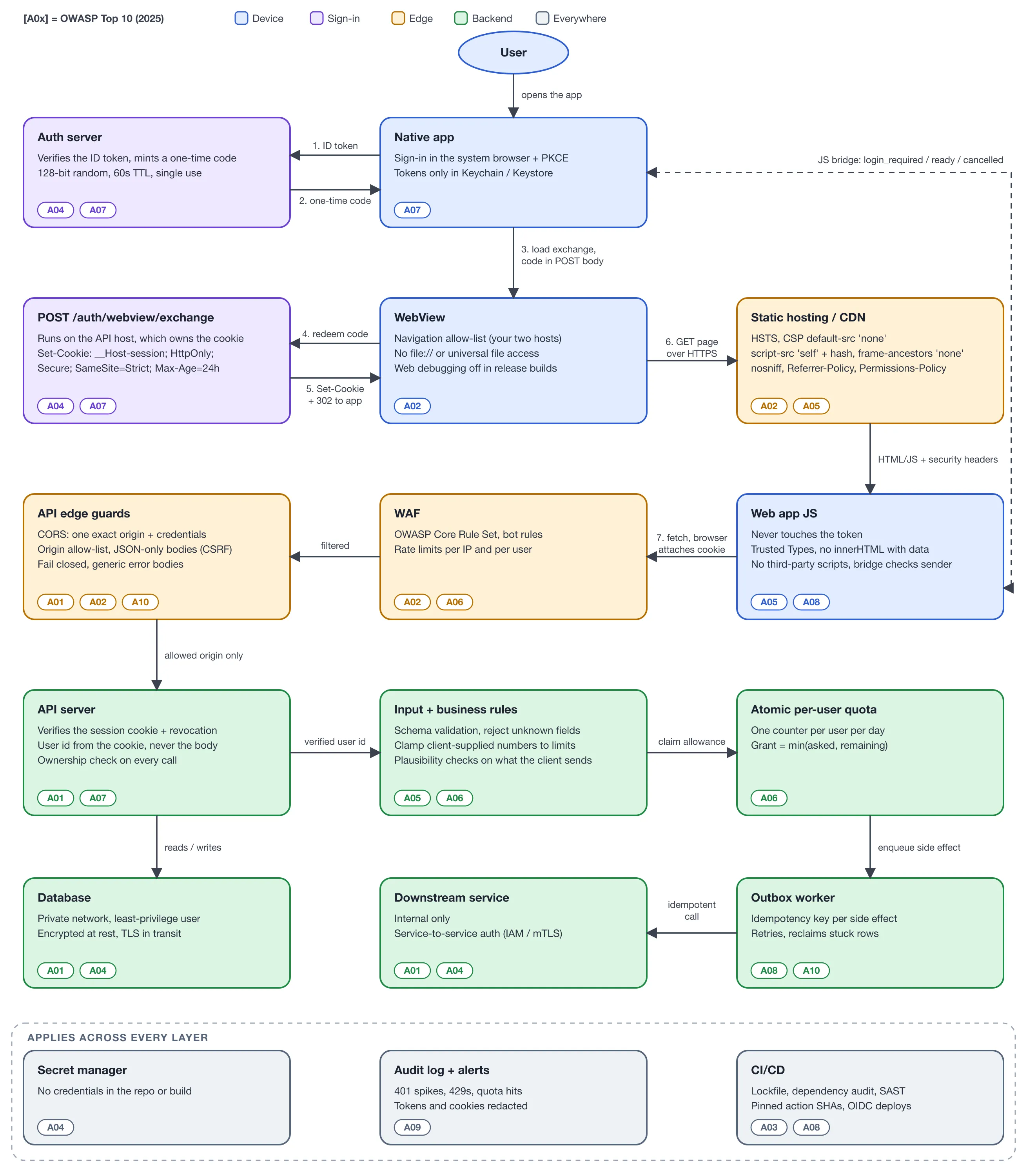
Every box is tagged with the OWASP risks it covers. Follow the numbers 1 to 7 for the login flow.
Rule zero: never log in inside the WebView
Before anything else, one rule from RFC 8252 (OAuth 2.0 for Native Apps): the sign-in itself must never happen inside an embedded WebView. The native app opens the system browser — ASWebAuthenticationSession on iOS, Custom Tabs on Android — and the user signs in there, using PKCE.
Why? Because the app that owns a WebView can read everything typed into it. A login page inside your WebView trains users to type their password into any app that shows them a login form. The system browser is a boundary the app can’t see through.
So after sign-in, the native app holds the tokens (in the Keychain or Keystore). The WebView holds nothing. Now we need to get a session into it.
The approach everyone tries first: inject a cookie
The obvious move is to take a session value from your auth server and write it straight into the WebView’s cookie store before loading the page. On Android that’s CookieManager.setCookie(...); on iOS it’s WKHTTPCookieStore.setCookie(...). The web page then makes fetch calls with credentials: 'include' and the browser attaches the cookie. The JavaScript never holds a token. Lovely.
You’d also mark the cookie HttpOnly, so that if your page ever has an XSS bug, the attacker’s script can’t read the session and send it somewhere.
And here is the gotcha.
On iOS, the obvious way to build a cookie in native code has no HttpOnly option.
HTTPCookie(properties:) has no documented key for HttpOnly. If you try to sneak one in with HTTPCookiePropertyKey("HttpOnly"), the initializer returns nil and the cookie is never set at all. Android’s CookieManager honours the flag fine. So it’s very easy to end up with an architecture diagram that says “HttpOnly” and an iOS app where the cookie is readable by any script on the page.
There is a way around it. HTTPCookie.cookies(withResponseHeaderFields:for:) builds cookies by parsing a Set-Cookie header string, and that route can carry the HttpOnly flag. But now each platform has its own cookie-building code, and on iOS you’re relying on a side door rather than a documented property. That’s exactly the kind of detail that silently breaks in a refactor, and nobody notices because login still works.
It would still authenticate correctly either way — the server checks the value regardless. What you lose is the XSS protection, and only on one platform, which is the worst kind of bug to catch.
So here is the cleaner answer: let WebKit and Android’s WebView receive the cookie the normal way, through an HTTP Set-Cookie response. Both handle that correctly, with no per-platform code. Let the server set it.
The better approach: a one-time code exchange
Follow the numbers in the diagram.
1–2. Native trades its ID token for a one-time code. The native app calls your auth server with the ID token it got from sign-in. The server verifies it and returns a short random code. Make the code boring and strict: at least 128 bits of randomness, it lives for about 60 seconds, and it can be used once. The server remembers which user it was minted for.
One thing I want to be honest about: in this flow the code is the credential. When the WebView redeems it, the server has no proof which device is holding it. You could add that proof — have the native app keep a private key in the Secure Enclave or Android Keystore, register the public key, and sign a challenge at redemption — but for most consumer apps I wouldn’t. A high-entropy, single-use, 60-second code is already a very small target. Just don’t write “bound to the device” in your docs unless you’ve built the signature part.
3–4. The WebView redeems the code. Native loads the exchange endpoint in the WebView, with the code in a POST body. Keep it out of the URL — URLs end up in logs, history and Referer headers, and even a 60-second secret doesn’t belong there.
5. The server sets the cookie. The exchange endpoint burns the code and responds with:
Set-Cookie: __Host-session=<signed value>; HttpOnly; Secure; SameSite=Strict; Path=/; Max-Age=86400
Location: https://app.example.com/
Every flag here is doing a job:
HttpOnly— scripts can’t read it. And because the server set it, this now holds on iOS too.Secure— only ever sent over HTTPS.SameSite=Strict— not sent on requests started by other sites. It still works for your own app, becauseapp.example.comandapi.example.comare the same site (same registrable domain), even though they’re different origins. More on why that cuts both ways in a moment.__Host-prefix — the browser refuses the cookie unless it’sSecure,Path=/and has noDomainattribute. That means it’s locked to the API host. A forgottenstaging-thing.example.comsubdomain can’t read it or overwrite it. If you’ve ever writtenDomain=.example.com“so it works everywhere”, this is why you shouldn’t.Max-Age=86400— one day, not a month. When it expires, the web page asks native to log in again (the dashed bridge line in the diagram), and native silently does steps 1–5 again.
6–7. The page loads and calls the API. The web app comes from a static host, and every fetch to the API carries the cookie automatically. The JavaScript never sees a token on either platform.
Put the exchange on the host that owns the cookie
This one bites people. Because __Host- cookies are host-only, the exchange endpoint has to live on the same host your API calls go to. If the exchange is at api.example.com and the page calls api.example.com, it works. If the exchange is at auth.example.com and the page calls api.example.com, the cookie is stored for auth.example.com and never gets sent to your API. Login “succeeds”, and every API call returns 401.
SameSite is not your whole CSRF defence
SameSite=Strict is a strong layer, but it’s defence in depth, not the complete answer. Remember that every subdomain of example.com is the same site. If old-marketing-page.example.com gets compromised, requests it makes to api.example.com are same-site, and the browser will attach your cookie.
CORS doesn’t save you here either. CORS stops another origin from reading your responses. It doesn’t stop the request from being sent.
So on every endpoint that changes state, also check the Origin header on the server and reject anything that isn’t https://app.example.com. Accept only application/json bodies, so a plain HTML form can’t post to you. For really sensitive browser flows, add a CSRF token on top.
Even better: one origin
If you control the hosting, there’s a simpler setup than two hosts. Serve the web app at app.example.com/ and reverse-proxy app.example.com/api/* to your API. Put the exchange at app.example.com/session/exchange.
Now everything is same-origin. The cookie belongs to app.example.com, and there’s no CORS to configure, no credentials: 'include', no preflight requests, and no chance of the “exchange on the wrong host” bug above. I’d pick this over two hosts whenever the infrastructure allows it. The diagram shows the two-host version because it’s the more common starting point, and the harder one to get right.
The cookie is not the security boundary
One thing I want to be really clear about: the cookie flags are a second layer. The real boundary is the server verifying the cookie on every request.
Anyone can write any value into a cookie named session. Only a correctly signed, unexpired, not-revoked one should get through. So the API server checks the signature and checks for revocation, so that “log out everywhere” or a banned account takes effect immediately, not in 24 hours.
And the user id comes from the verified cookie, never from the request body. If an endpoint accepts { "userId": 42 } from the client, it’s just a matter of time before someone changes that 42.
Walking through the OWASP Top 10 (2025)
Now let’s check the whole thing against the OWASP Top 10. Each tag in the diagram maps to one of these.
A01 — Broken Access Control. User id from the cookie only, an ownership check on every call (“does this record belong to this user?”), an Origin check on state-changing requests, and internal services that aren’t reachable from the internet at all. CORS locked to one origin helps too, but only for who can read responses.
A02 — Security Misconfiguration. This is where hybrid apps quietly leak. On the WebView: a navigation allow-list so it can only load your two hosts, no file:// access or universal file access, and web debugging switched off in release builds. On the web host: HSTS, X-Content-Type-Options: nosniff, a Referrer-Policy and a Permissions-Policy. In front of the API: a WAF.
A03 — Software Supply Chain Failures. A committed lockfile, dependency audits and Dependabot, CI actions pinned to a commit SHA rather than a moving tag, and deploys that use short-lived OIDC credentials instead of a long-lived key sitting in a CI secret. And on the page itself: no third-party scripts. Every script you load from someone else’s domain can read everything your page can.
A04 — Cryptographic Failures. TLS everywhere, a signed session value, a one-time code with real randomness, encryption at rest for the database, and credentials kept in a secret manager — never in the repo or baked into the build.
A05 — Injection. A strict Content-Security-Policy: default-src 'none', script-src 'self' plus a hash for any inline script, and connect-src limited to your API. Even if someone manages to inject a script, it can’t load code from elsewhere or send data anywhere but your own API. Add Trusted Types where the WebView supports it, stop using innerHTML with data, and validate every request body against a schema that rejects unknown fields.
A06 — Insecure Design. This is the one people skip, and I’ll come back to it below. Rate limits per IP and per user, limits on any number the client sends you, and an atomic per-user quota.
A07 — Authentication Failures. Sign-in in the system browser with PKCE, a single-use short-lived code, server-side verification with a revocation check, and a short session lifetime.
A08 — Software or Data Integrity Failures. The JS bridge between native and web should check who sent each message, and only accept a fixed set of message types. Retried side effects need an idempotency key so a retry can’t happen twice. And CI should be the only thing that can deploy.
A09 — Security Logging and Alerting Failures. Log the things that indicate an attack — spikes of 401s, lots of 429s, users hitting their quota, revoked sessions still being tried — and alert on them. Redact cookies and tokens before anything is written to a log.
A10 — Mishandling of Exceptional Conditions. When something unexpected happens, fail closed: deny the request, return a generic error body (no stack traces), and make sure a half-finished operation can be retried safely. An outbox worker that reclaims stuck jobs is one way to get there.
The part authentication doesn’t solve
Here is the thing that catches a lot of teams out. All of the above proves who is calling. None of it proves that what they send is honest.
Once a user is signed in, they can open the WebView’s traffic in a proxy and send whatever they like — with a perfectly valid cookie. If your client sends a number the server acts on (a score, a quantity, a progress value), a valid session doesn’t make that number true.
You have two options. Recompute everything on the server, or accept the client’s number and bound the damage:
- Clamp every client-supplied number to what’s actually possible. Not a
400— just cap it. - Check plausibility. If something takes at least 30 seconds to do and the client claims it finished in 2, reject it.
- Keep an atomic per-user quota, for example one counter per user per day, and grant
min(asked, remaining). Do this with a single atomic update, not “read the total, compare, then write” — two requests arriving together will both pass that check. - Put side effects behind an outbox with an idempotency key, so a retry or a double submit lands exactly once.
With those in place, the worst a tampered client can do is the best an honest user could do on their best day. That’s a limit you can write down and defend.
So why does this feel like a lot?
Because a hybrid app really is two apps with a trust boundary between them, and each side has its own set of mistakes to make. But look at the diagram again: most of the boxes are configuration, not code. Headers, cookie flags, WebView settings, a WAF rule, CI settings. The actual new code is one exchange endpoint and a few checks in your API.
If you take just one thing away from this: let the server set the cookie. It’s the difference between an HttpOnly cookie on paper and an HttpOnly cookie on every phone.
In the next article I want to go deeper on the JS bridge itself — how native and web should talk to each other without either side trusting the other too much. Stay tuned! :)
Ask the archive
Got a question about this or anything else here? Ask, and get the passage that answers it — from all 97 posts, in your browser.